Change clothes in a photo with AI
Explore a different outfit in a photo you already have. Describe the clothes, colors, and style, or add an outfit reference to guide the edit.
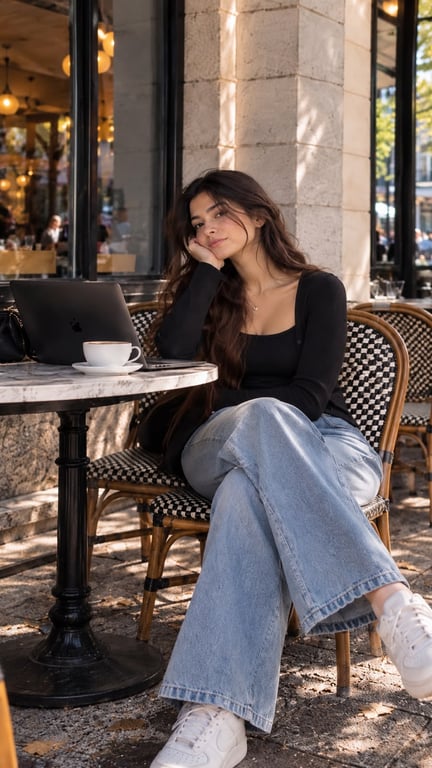
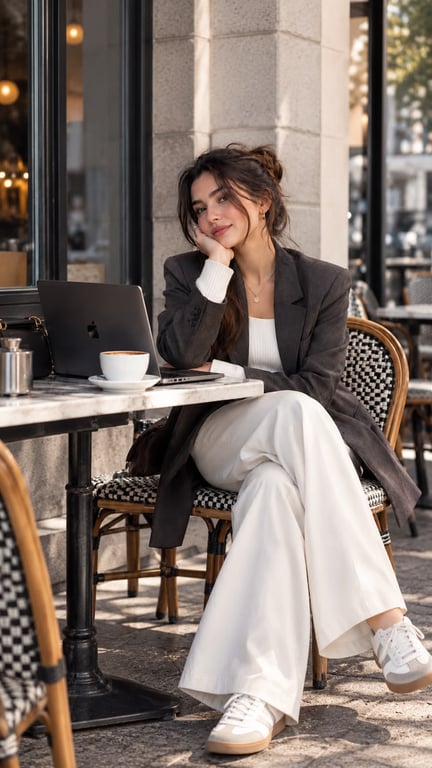
A different outfit in a portrait
How it works
Choose your portrait
Upload a clear photo where the clothing you want to change is visible.
Describe the new look
Name the clothing, colors, and style, or add an outfit reference. Include any details you want to keep.
Review before generating
Continue in the editor with your photo and outfit instructions. Sign in and check the credit cost, then generate and inspect the result.
Pricing plans
Starter
For getting started
per month · billed $99.99 every 6 months
per month · ≈ 500 AI images
Up to 3 model trainings per month
- 5,000 shared credits per month
- Use credits for up to 92 Nano Banana Pro images or 250 GPT Image 2.5 medium images
- Create up to 8 Seedance 2.5, 11 Kling 3.0 Pro, or 14 Grok Imagine clips (5 sec)
- Generate up to 500 standard AI images and AI photos every month
- Refine up to 500 photos with AI editing every month
- Starter credit pool for lighter AI video, editing, and upscaling projects
Hobby
For regular creators
per month · billed $149.99 every 6 months
per month · ≈ 900 AI images
Up to 6 model trainings per month
- Everything in Starter, plus 4,000 additional credits per month
- Added credits alone cover 2 model trainings, 74 Nano Banana Pro images, or 200 GPT Image 2.5 medium images
- Or 6 extra Seedance 2.5, 9 extra Kling 3.0 Pro, or 11 extra Grok Imagine clips (5 sec)
- Generate up to 900 standard AI images and AI photos every month
- Refine up to 900 photos with AI editing every month
- More credits for regular AI video, PhotoGPT Flow, and upscaling workflows
Pro
For power users
per month · billed $199.99 every 6 months
per month · ≈ 1600 AI images
Up to 10 model trainings per month
- Everything in Hobby, plus 7,000 additional credits per month
- Added credits alone cover 4 model trainings, 129 Nano Banana Pro images, or 350 GPT Image 2.5 medium images
- Or 11 extra Seedance 2.5, 16 extra Kling 3.0 Pro, or 19 extra Grok Imagine clips (5 sec)
- Generate up to 1600 standard AI images and AI photos every month
- Refine up to 1600 photos with AI editing every month
- Largest credit pool for frequent MiniMax Hailuo H3, Google Omni, Grok Imagine Video 1.5, Seedance 2.0, Veo 3.1, Kling 3.0, and 4K video production
Frequently asked questions
- Try a new outfit direction. Explore a casual, tailored, or editorial look using an existing portrait as your starting point.
- Explore clothing colors. Describe a new color palette while asking to keep the garment style and the rest of the photo.
- Develop a creative concept. Bring an outfit reference into a portrait to explore styling ideas for creator content or a shoot.
Outfit edits are creative previews. They do not predict garment fit or guarantee exact fabric, color, logos, or product details; faces and body details may also change.
Yes. Describe the garments, colors, and style you want. If you have a reference, add it to guide the outfit and use the description for any refinements. A reference opens the editor in Combine mode.
Specify the garment and the change, such as a navy shirt, and ask to keep the other clothes and background. The edit is generated, so check whether other details changed too.
No. This is a creative outfit edit, not a size or fit prediction. Garment shape, fabric, colors, and logos may differ from a reference. Review the person and clothing before using the result.
Generation uses credits. You can prepare the photo and outfit here, then sign in and review the cost for your chosen model and settings in the editor before generating.