1. IDENTITY AND GENDER PRESERVATION — HIGHEST PRIORITY
Use the uploaded photograph as the exact identity reference.
Preserve the subject’s:
* Original gender and gender presentation.
* Exact facial identity and facial structure.
* Eyes, nose, lips, jawline and natural skin tone.
* Age and recognizable appearance.
STRICT GENDER LOCK: Automatically identify whether the uploaded subject is male or female and preserve that gender throughout the generation.
If the reference subject is male, the generated subject MUST remain male.
If the reference subject is female, the generated subject MUST remain female.
Never convert a male subject into a female or a female subject into a male.
The uploaded photograph is ONLY an identity reference. Do not copy its original hairstyle, outfit, makeup, accessories, pose or background.
2. AUTOMATIC GENDER-ADAPTIVE FASHION STYLING
Create a bold, funky, premium Gen-Z streetwear editorial look.
Independently select a completely new hairstyle, outfit, accessories and styling according to the subject’s original gender, facial structure and appearance.
For male subjects:
* Experiment with textured messy hairstyles, modern fades, spiky hair, layered fringes, voluminous styles and contemporary cuts.
* Optional streetwear caps, beanies and other masculine headwear.
* Oversized racing jackets, varsity jackets, graphic hoodies, layered tees, baggy cargos, relaxed denim and statement sneakers.
* Layered chains, pendants, rings, bracelets, watches and masculine streetwear accessories.
* Maintain natural masculine grooming and preserve existing facial hair.
For female subjects:
* Experiment with voluminous curls, messy waves, braids, ponytails, creative updos, layered cuts and contemporary hairstyles.
* Optional stylish caps, beanies and creative hair accessories.
* Oversized racing jackets, varsity jackets, graphic tops, cropped layers, baggy cargos, parachute pants, wide-leg denim and statement sneakers.
* Coordinated makeup ranging from soft glam to expressive editorial makeup.
* Layered necklaces, statement earrings, hoops, rings, bracelets and fashionable accessories.
These are styling possibilities, not fixed combinations.
Every generation should have a fresh, coordinated fashion identity. Never use a locked hairstyle or repetitive outfit combination.
Avoid basic everyday clothing, generic AI fashion looks and random mismatched accessories.
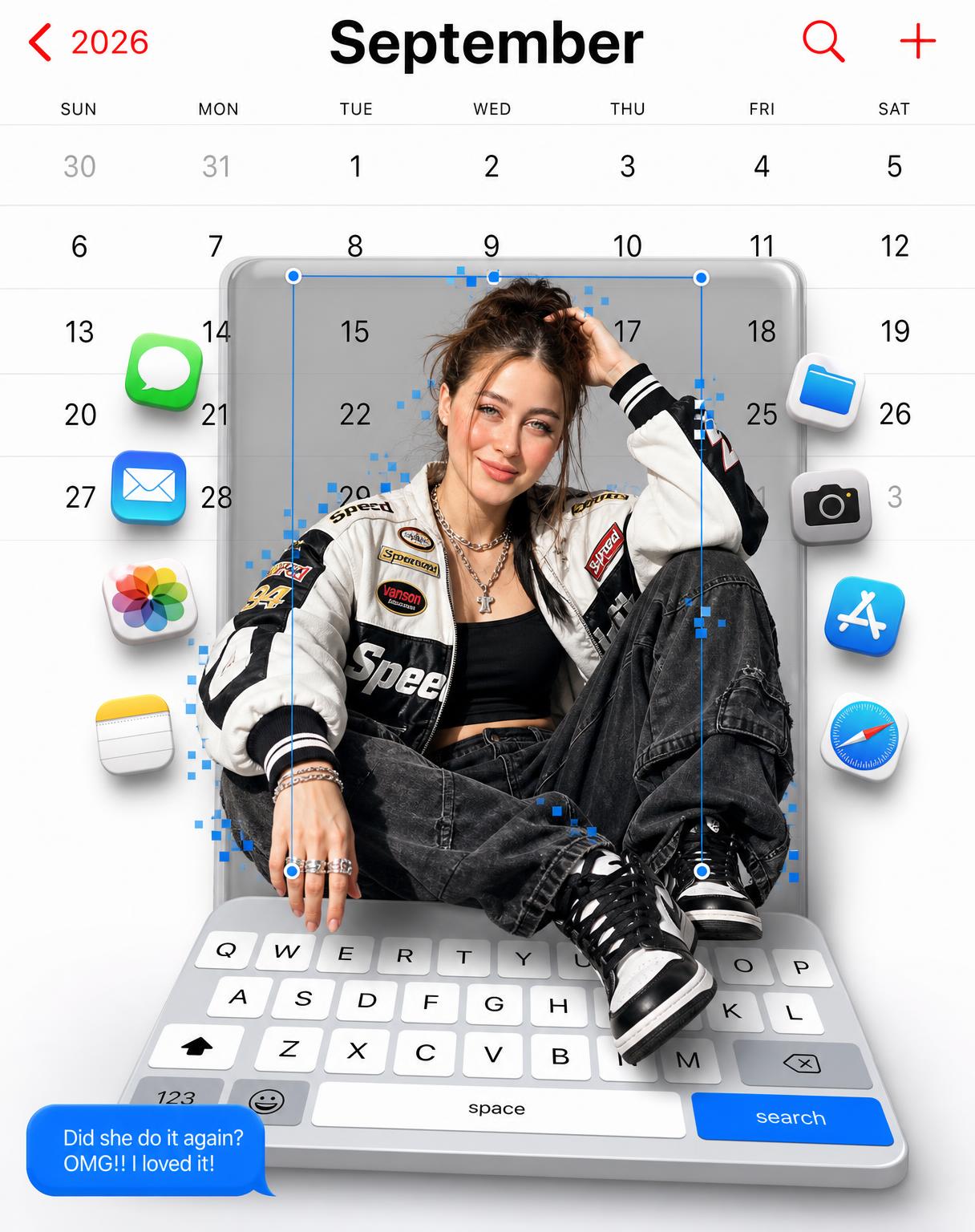
3. FULL-SCREEN IPHONE CALENDAR — WHITE LIGHT MODE
Create a full-screen iPhone-style September 2026 calendar interface covering the entire background edge to edge.
LIGHT MODE IS MANDATORY.
Use a bright pure-white (#FFFFFF) background with:
* Large black September heading.
* Red back navigation arrow.
* 2026 navigation label.
* Search icon and plus icon.
* Correct September 2026 calendar dates and weekday labels.
* Thin, subtle light-grey calendar separators.
* Clean, authentic iOS-inspired typography.
The entire calendar must remain bright white and clearly readable.
Never use dark mode, black backgrounds, dark-grey backgrounds, inverted colours or a dimly lit calendar.
No physical smartphone, phone bezels or external background.
4. CENTRAL TRANSLUCENT GREY FLOATING PANEL
Place a large translucent smoky-grey rounded rectangular floating panel in the centre, behind the subject.
The panel must have:
* Prominent rounded corners.
* Realistic semi-transparent glass-like appearance.
* Subtle dimensional thickness.
* Natural shadows around its edges.
* Visible separation from the white calendar background.
The panel must look like an actual floating 3D interface element, not a flat grey rectangle.
IMPORTANT: Keep the white calendar visible around the panel. The grey panel must never darken the entire composition.
5. SUBJECT AND 3D POP-OUT POSE
Position the subject centrally, emerging physically from the floating grey panel.
Use a completely new, confident, playful fashion-editorial pose for every generation.
Automatically adapt the pose to the subject’s gender and styling.
Choose a dynamic seated or diagonally positioned pose with natural asymmetry, interesting leg positioning and believable hand placement.
One hand can interact with a suitable accessory, cap, hair or jacket, while the other rests naturally on a bent knee or extends beyond the panel.
Avoid repeating the original reference photograph’s pose.
The subject must visibly extend beyond the panel boundaries, creating a convincing screen-pop-out illusion.
Maintain realistic body proportions, natural anatomy and believable physical positioning.
6. PIXELATED POP-OUT EFFECT
Add a thin electric-blue selection bounding box around the subject, with small circular adjustment handles.
Add selected crisp square pixel fragments around portions of the subject’s silhouette, especially near the hair, shoulders and lower body.
Keep the effect controlled, sharp and visually integrated.
7. TILTED 3D IPHONE KEYBOARD — CRITICAL
Create a large, realistic iPhone keyboard across the bottom 20–25% of the composition.
The keyboard must emerge from the bottom of the central panel and tilt outward towards the viewer.
Its top edge must appear farther away and narrower, while its bottom edge appears closer and wider.
Create a convincing 3D perspective, like a physical keyboard extending out of the screen.
Include:
* White raised alphabet keys.
* Grey function keys.
* Shift and delete keys.
* Number and emoji keys.
* Long white space bar.
* Bright blue search key.
Add subtle raised edges, dimensional thickness and realistic shadows.
The subject’s legs must overlap the upper portion of the keyboard.
Never create a flat keyboard or a keyboard pasted onto the bottom of the image.
8. FLOATING IOS APP ICONS
Add colourful dimensional iOS-style app icons on both sides of the subject.
Include Messages, Files, Photos, Camera, Mail and other recognizable app icons.
Use varied sizes, subtle rotations, different spatial depths and realistic shadows.
Keep the icons sharp and recognizable.
9. BLUE IMESSAGE BUBBLE
Add a bright blue iMessage-style speech bubble in the lower-left foreground.
Display this exact text:
“Did she do it again? OMG!! I loved it!”
Use crisp, readable white lettering.
Do not cover the subject’s face or important outfit details.
10. ULTRA-REALISTIC RENDERING
Create a premium combination of professional fashion photography and sophisticated 3D interface design.
Maintain:
* Natural skin pores and facial details.
* Detailed individual hair strands.
* Realistic clothing textures and folds.
* Accurate jewellery reflections.
* Natural shadows and dimensional layering.
* Correct perspective and realistic anatomy.
* Sharp, readable calendar text and keyboard details.
Keep the entire composition crisp and sharply defined. Create depth through perspective and shadows, NOT blur.
FINAL REQUIREMENTS
Vertical 3:4 composition.
The final visual arrangement must follow this exact hierarchy:
Full-screen WHITE September 2026 iPhone calendar → central translucent smoky-grey floating panel → gender-preserved, fashion-styled subject emerging from the panel → floating colourful app icons → tilted 3D iPhone keyboard in the bottom foreground → blue message bubble.
ABSOLUTE RESTRICTIONS:
No gender transformation, no dark mode, no black calendar background, no physical phone frame, no flat keyboard, no missing grey panel, no generic styling, no copied original hairstyle or pose, no plastic skin, no distorted anatomy, no extra fingers, no motion blur, no haze, no watermark.
提示词

1. IDENTITY AND GENDER PRESERVATION — HIGHEST PRIORITY Use the uploaded photograph as the exact identity reference. Preserve the subject’s: * Original gender and gender presentation. * Exact facial identity and facial structure. * Eyes, nose, lips, jawline and natural skin tone. * Age and recognizable appearance. STRICT GENDER LOCK: Automatically identify whether the uploaded subject is male or female and preserve…

尺寸1216px x 1536px
参考图片

源图片 1

开始探索

加入拥有数千名活跃用户的 Discord 社区,了解最新提示词灵感并探索社区作品